.svg)
Table of Contents
Sending a voice message is straightforward. Below, you will find several methods to do so successfully. Please note that while these solutions are useful for individual messaging, they are not designed for reaching your entire audience at once.
How do I send a voice message using Android voice commands?
While your Android smartphone's voice command feature is great for launching apps, it can also perform other tasks using only your voice. You can send a text message without ever touching your phone's keyboard.
Android voice recognition requires an active internet connection. To activate it, tap the microphone icon in the search bar on your home screen, then dictate your message.
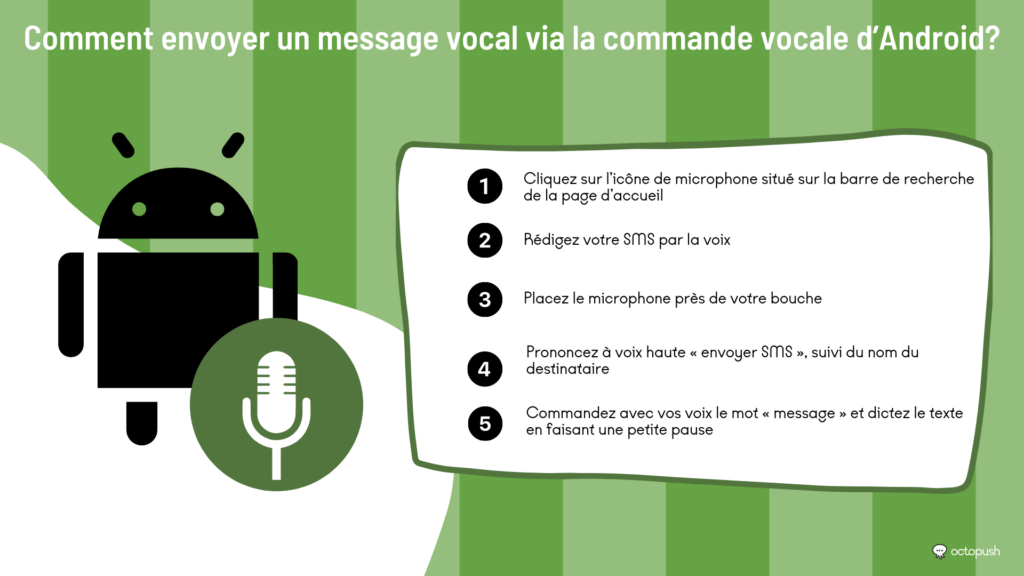
Once the voice command feature is active, hold the microphone near your mouth. Say "Send SMS" followed by the recipient's name. Make sure the contact's phone number is already saved in your phone's directory.
Say the word "message" and dictate your text, pausing briefly to allow the system to process your speech. The Android voice recognition system will then draft the SMS. To finish, tap the send button.
How to send a voice message via SMS to a landline
As you can see, there are countless ways to send a voice message. However, these methods have drawbacks for professional use, such as the need for specific apps or the requirement to use a physical phone device to initiate the send.
Furthermore, if you need to reach recipients who do not have an Android or iPhone, online platforms like Octopush are available to help.
The voice SMS service offered by Octopush allows you to compose text messages that are converted via a text-to-speech system, so your recipient hears them as a phone call. This allows you to transmit your messages even to landline numbers.
To get started, log in to your user account. If you haven't created one yet, you can do so for free by clicking the "Try it" button in the menu at the top of this page.
Once on your dashboard, click the "New Campaign" button in the left-hand menu and select "Voice SMS" as the campaign type.
Beyond standard SMS features like scheduled delivery, voice messages offer unique options such as choosing the language and gender of the synthetic voice. Additionally, you have 1,000 characters to compose your message instead of the usual 160, resulting in a call of up to 30 seconds.
How do SMS platforms ensure the delivery of voice messages?
Communication platforms often partner with mobile operators worldwide. By using real phone numbers from local operators in each region, the platform's server can transmit an SMS message to the test node. Furthermore, they provide valuable data such as delivery confirmation, delivery speed, sender identity, and connection status. In short, sending a voice message is a highly advantageous practice.

Through an SMS API, the platform can also receive feedback on delivered voice messages. Using this approach, developers can identify messages containing an OTP key. The results are then reported once the user successfully authenticates their account.
This is essential, especially in countries where operator networks are often unstable. Our SMS platform works with a wide range of mobile operators. We select the best providers to ensure unbeatable transfer rates for 2FA via OTP keys on voice SMS.
Conclusion
The term "voice message" is often quite vague, and its meaning can vary depending on the context. On one hand, it can refer to composing an SMS using your voice instead of a keyboard. On the other, it can easily be confused with sending voice recordings.
In this case, a voice SMS is a type of SMS message that uses TTS technology to convert a text-based message into a phone call.